Your prompt is submitted, the image is still pending, and a new mini PC suddenly looks tempting. Before paying for a faster processor, find out which part of the session is actually holding you up.
Midjourney generation, browser responsiveness, downloads, and local editing are separate jobs. Treating them as one hardware benchmark can turn a service-side delay into an unnecessary computer purchase.
Can a mini PC run Midjourney?
A mini PC can use Midjourney as a cloud client.
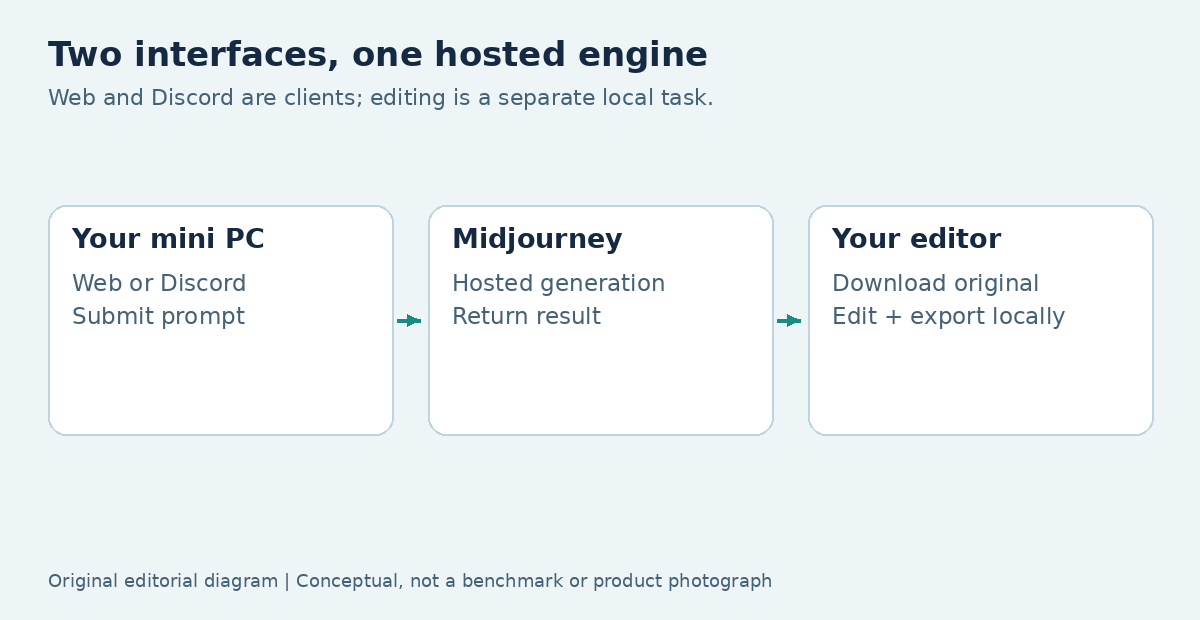
Use the official web or Discord route; the computer handles your interface and files while Midjourney performs generation remotely, so local GPU upgrades do not accelerate its servers.
The official getting-started guide describes subscribing and creating through the website. Midjourney also provides a Discord quick start. Neither route installs an official offline Midjourney model on your computer.
The useful compatibility question is whether your mini PC handles the supported interface and your surrounding applications comfortably. There is no basis here for inventing a dedicated GPU or fixed RAM minimum for Midjourney itself. If your requirement is a genuinely downloaded model, the local AI guide covers that different category of work.
Is the wait happening in Midjourney or on your desktop?
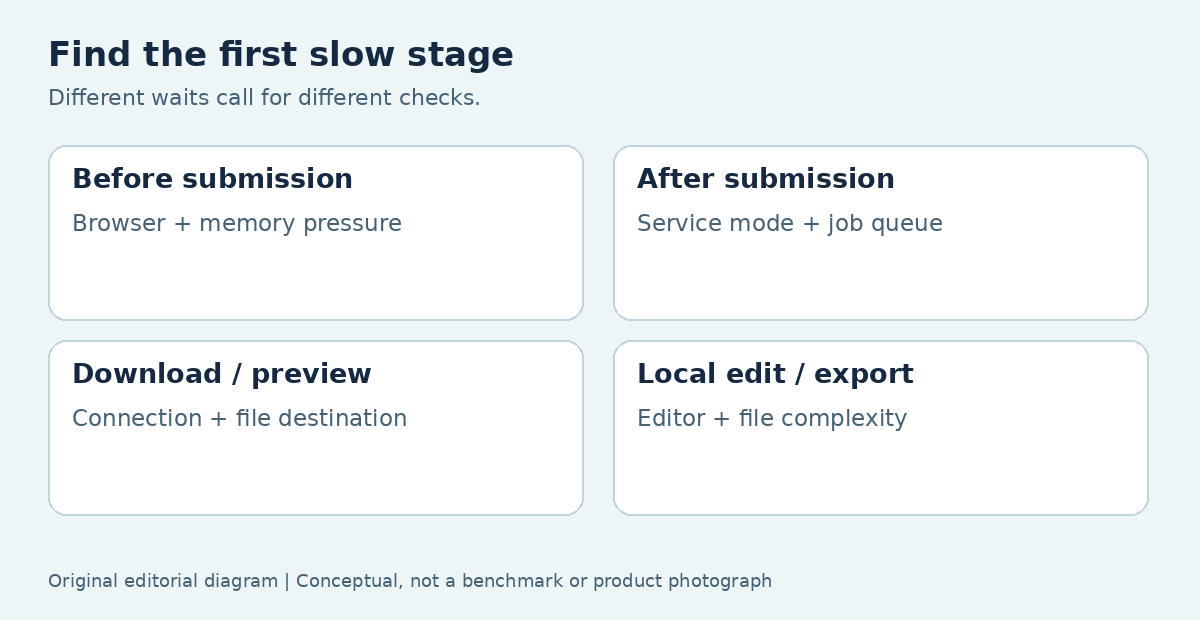
Identify the first slow stage before changing hardware. A delay before submission usually calls for different checks from a queued job or a slow local export. Keep one ordinary, nonconfidential project as your reference so you are comparing like with like.
A short record is more useful than an impression that the whole session feels slow. Note what you clicked, what happened next, whether other applications remained responsive, and whether the problem repeats.
- Before submission: inspect browser responsiveness and local resource pressure.
- After submission: inspect job state, selected service mode, and account limits.
- During retrieval: inspect connectivity, file destination, and local storage.
- During editing: inspect the editor, file complexity, and its acceleration settings.
Avoid running several unrelated fixes at once. If you change the browser, network, and editor settings together, a successful retry will not tell you which change mattered.
When the page stalls before you submit
A page that is difficult to type into or navigate warrants a client-side check first. Compare it with another ordinary site, and observe whether the desktop is also sluggish. That separates a general computer problem from something confined to one application.
Close unnecessary tabs, let a large background update finish, and try the current supported browser without optional extensions interfering with the session. Keep security protection enabled. If the same account works normally in another supported browser, a new computer is unlikely to be the first useful remedy.
For recurring problems, look at memory pressure and free storage while your real applications are open. Do not judge the machine from an empty desktop. A creator who keeps an editor, many reference tabs, and large project files open has a different local workload from someone entering prompts in one tab.
When a submitted job waits in the queue
A submitted job can be waiting on the service rather than your processor. Midjourney’s GPU speed documentation distinguishes its processing modes and explains that service GPU time is not the same as elapsed waiting time.
Check the job’s state and the mode available to your model and subscription before repeatedly resubmitting it. A faster network or local graphics card does not turn a remote queue into an empty one. Repeated submissions can also make it harder to identify which output belongs to the original request.
If a project has a deadline, assess the service options against the required turnaround instead of treating a mini-PC upgrade as a substitute. Mode availability can vary by model version. Keep the chosen mode in your project notes, and compare waits under similar conditions rather than converting one unusually quick result into a performance promise.
When downloads or previews are the slow part
Slow retrieval calls for a transfer and file-management check. Try downloading one selected image to a known local folder with adequate free space. If that succeeds quickly but a synchronized folder lags, inspect the destination and synchronization workload before blaming generation.
The Organizing Your Creations guide explains the service’s organization and download controls. Keep original downloads separate from edited versions, and use a consistent naming convention that preserves the project context. A browser cache or a thumbnail is not your only archive.
A wired connection can be worth testing when Wi-Fi is unreliable, but it is a diagnostic comparison rather than a guaranteed speed improvement. Also confirm that you are judging the actual downloaded file in your editor. A slow preview and an incomplete download are different failures and need different evidence.
When editing the downloaded image is slow
Once the file is local, the editor and the document determine the workload. Large layered projects, multiple open images, masks, and export tasks can demand much more than viewing a generated image in a browser.
Use the editor’s documented requirements and a representative file to evaluate the mini PC. Watch whether the delay happens when opening the file, applying a specific effect, moving between layers, or writing an export. A GPU may help a supported editing feature while doing nothing for a disk-bound save operation.
Confirm monitor connections at the same time. A machine advertised for one high-resolution display may have different limits when several outputs are used together. Check the exact ports and simultaneous-display combinations instead of assuming every USB-C socket carries video. These are legitimate reasons to change hardware, but they belong to local production work, not Midjourney’s generation engine.
Do the web and Discord routes need different hardware?
They are alternative interfaces to the same hosted service, not separate local rendering engines. Choose the route that fits your organization and collaboration habits, then check the requirements of the interface you actually use.
The web route keeps creation and browsing within the website. Discord adds a messaging environment, servers, channels, and bot interactions. Keeping more applications and conversations open may change the local memory workload, but that is not evidence of a different Midjourney GPU requirement.
When troubleshooting, switching interfaces can help isolate an interface-specific issue. Keep the prompt and relevant generation settings consistent, and do not treat a difference in queue time as proof that one client computer generated faster. If you can submit successfully through either route, investigate the remaining service or workflow constraint on its own terms.
When a privacy setting is mistaken for offline generation
Visibility settings do not move generation onto the mini PC. Midjourney’s Stealth documentation describes control over visibility on its website and warns that work created in public Discord channels remains visible to others.
Before uploading a client reference or private material, check both the service setting and the place where you are generating. A private-looking desktop window is not evidence that processing stays on the device. Also distinguish hiding a creation, deleting it from a view, and controlling who can access its files.
If your project requires offline processing, choose a separately licensed local model and assess that full workflow. Do not rely on a download advertised as offline Midjourney or on a community model trained to imitate a style. Product identity, permission to upload, and file visibility are separate questions.
When buying another computer actually makes sense
A replacement makes sense when it resolves a measured local constraint that affects your finished work. Examples include insufficient working memory for the editor, missing display outputs, inadequate storage expansion, or an unsupported operating system for required applications.
Separate that purchase from the service budget. The Midjourney plan comparison lists recurring plans and their different usage and visibility features. A mini PC does not include those entitlements, and buying faster hardware does not replace them.
Write a compact acceptance task before you shop: open your usual apps, inspect images on the intended monitors, edit a representative file, export it, and confirm backup. If local generation is also part of the plan, use the local AI configuration comparison rather than assuming a cloud-friendly office computer will suit every downloadable model.
Fix the slow stage, then make the purchase
Keep the existing machine when it handles browsing, files, and editing well. When it does not, target the constrained component or choose a replacement with a clear acceptance task. That makes the purchase about an observable need instead of a general AI marketing claim.
For account or service delays, use the provider’s current guidance. For desktop setup and maintenance, continue with Mini PC Land’s mini-PC guides. The best outcome may be a working browser, a better file destination, or a more suitable subscription workflow rather than another box on your desk.
FAQ
Can I keep using downloaded Midjourney images without internet access?
You can open and edit files already saved on your computer using local applications that work offline. That does not allow you to submit new Midjourney generation jobs without a connection. Before traveling or working away from your network, download the actual files you need, confirm that they open, and make sure your editor and required assets are available. Do not rely solely on a browser gallery or cached preview.
Would an eGPU shorten my Midjourney wait?
An external GPU does not process Midjourney's hosted jobs, so it is not a remedy for its queue. It may help another local application if the computer, connection, operating system, and application support that arrangement. Evaluate that separate benefit using a real editing or rendering task before buying. Include the enclosure, graphics card, cabling, compatibility, and desk-space costs rather than judging only the advertised GPU performance.
Why do hardware guides list different Midjourney RAM requirements?
Many guides are recommending a complete creative workstation rather than stating an official service minimum. A browser-only session, a browser plus a photo editor, and local image generation are different workloads. Read what the proposed configuration is expected to do and whether its recommendation is tested or simply editorial. Use your own normal applications and files to check working memory instead of treating a generic number as a platform requirement.
Can I choose a mini PC solely from its AI branding?
No. Check the specific applications, monitor connections, available memory, storage, and support you need. An NPU or AI-ready label does not establish that your editor can use it, and it does not relocate a hosted service onto the computer. A modest system with the right ports and responsive local workflow can be a more suitable client than a more expensive configuration purchased for acceleration you never use.